7 Topics
 5 Days
 38 Sessions
Programme Overview
Training Description
Who Should Attend
This course is aimed at organizational staffs who are conducting field data collection activities.
Session Objectives
- Create survey forms using Build or XLSForms
- Upload forms to an Aggregate server
- Load forms into Collect on an Android device
- Fill out forms with participants using Collect
- Upload survey data from Collect to Aggregate
- Analyze or export data in Aggregate
About the Course
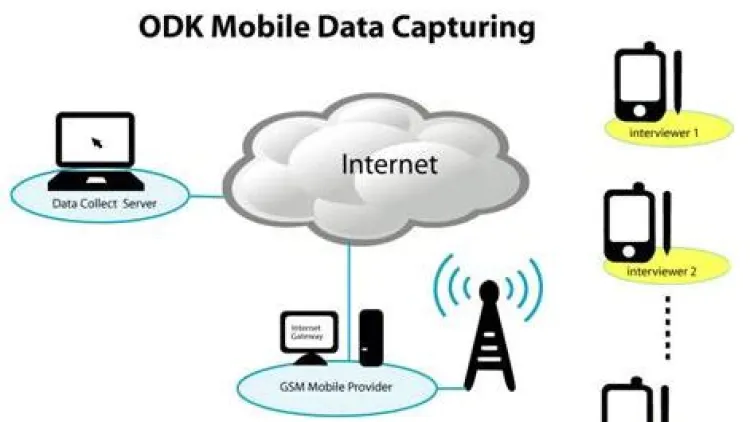
Technology has introduced new ways of collecting data for monitoring and evaluation that does not require the use of papers such as through the Mobile Data Collection (MDC). Using the MDC data is collected on the phone and transmitted to a server for analysis. This training will equip the participants with skills to author, field and manage mobile data collection platform using ODK.
Curriculum & Topics
7 Topics | 38 Sessions
-
 Workshop 1.1:
Introduction to collection of mobile data
Workshop 1.1:
Introduction to collection of mobile data
-
Workshop 1.2:
Platforms for collection of mobile data
-
Workshop 1.3:
Advantages of Mobile Applications
-
Workshop 1.4:
Challenges
-
Workshop 1.5:
Aggregation, storage, and dissemination of data
-
Workshop 1.6:
Types of questions in a questionnaire
-
Workshop 2.1:
Components of Open Data Kit (ODK)
-
Workshop 2.2:
Platforms and formats of ODK
-
Workshop 2.3:
Download and installation of ODK collect into mobile phones
-
Workshop 3.1:
Creating ODK Collect Forms
-
Workshop 3.2:
Downloading forms;
-
Workshop 3.3:
Using Excel to create ODK Data Collect Form
-
Workshop 3.4:
Creating and Publishing forms to Agregate or XML
-
Workshop 3.5:
Designing forms directly on:
-
Workshop 3.6:
ODK Build
-
Workshop 3.7:
Koboform builder
-
Workshop 3.8:
PurcForms
-
Workshop 4.1:
Introduction to XLS forms syntax
-
Workshop 4.2:
Manually creating XLS forms
-
Workshop 4.3:
Constraints & Skips
-
Workshop 4.4:
Form validation
-
Workshop 5.1:
Installation and Setup of ODK Collect
-
Workshop 5.2:
Menus, Settings and Security of ODK Collect
-
Workshop 5.3:
Form Management in Collect
-
Workshop 5.4:
ODK Collect Best practices
-
Workshop 6.1:
Using Google App Engine to set up own aggregate server
-
Workshop 6.2:
ODK Aggregate Server configuration
-
Workshop 6.3:
Creating a server
-
Workshop 6.4:
Uploading the form to aggregate server
-
Workshop 6.5:
Submission of completed data to aggregate server
-
Workshop 6.6:
Exporting data from ODK Aggregate as CSV
-
Workshop 6.7:
Importing ODK – CSV file into statistical applications
-
Workshop 7.1:
Direct download of data from Aggregate
-
Workshop 7.2:
Outputting data through;
-
Workshop 7.3:
Google Spreadsheet
-
Workshop 7.4:
Google Fusion Tables
-
Workshop 7.5:
GPS Coordinates (Google maps) exportation to Fusion Tables
-
Workshop 7.6:
GPS data exportation for Mapping/Visualizing (fusion map)