15 Topics
 5 Days
 45 Sessions
Programme Overview
Training Description
Surveyors and Geomatics Engineers looking to enhance their data collection and mapping capabilities.
Urban and Rural Planners interested in utilizing drone technology for land-use assessment and planning.
Civil Engineers and Construction Professionals seeking to integrate UAVs into their infrastructure projects.
Environmental Consultants and Land Managers working on ecological surveys and environmental monitoring.
Government Officials and Regulatory Authorities involved in land use policy, management, and monitoring.
GIS Analysts and Geospatial Professionals aiming to incorporate aerial mapping data into GIS systems.
Session Objectives
- Understand UAV Technology: Learn the fundamentals of drone technology, UAV flight principles, and the components involved in drone mapping systems. Operate Drones Safely: Gain hands-on experience in drone operation, including take-off, flight paths, and landings, in compliance with aviation regulations. Collect High-Quality Aerial Data: Master the techniques for capturing high-resolution imagery, LiDAR, and thermal data with UAVs for surveying and mapping purposes. Process and Analyze Aerial Data: Learn how to process raw drone data using specialized software like Pix4D and DroneDeploy to create accurate maps, 3D models, and point clouds. Apply Drone Data for Land Use Planning: Understand how UAV-based data can be used in land-use planning, zoning, urban growth, and environmental management. Integrate Drone Data into GIS: Learn how to integrate drone mapping outputs into Geographic Information Systems (GIS) for advanced spatial analysis and decision-making. Optimize Surveying Projects: Explore how drones can improve accuracy, reduce costs, and accelerate the surveying process, especially for large-scale projects. Understand Legal and Ethical Considerations: Get familiar with drone operation regulations, airspace restrictions, and privacy laws related to UAV usage in surveying and land use planning. Conduct Real-World Applications: Apply learned concepts in practical exercises to solve common surveying and planning challenges through drone technology. Improve Reporting and Presentation: Gain skills in preparing reports and visual presentations using drone-generated data for stakeholders, planners, and decision-makers. This training course is designed to teach participants the full scope of using drones and UAVs in surveying and land use planning. From understanding the drone technology to applying UAV-collected data in GIS systems, this course prepares professionals to improve their mapping, planning, and decision-making capabilities using cutting-edge drone technology. With real-world applications in urban planning, infrastructure development, and environmental conservation, this course offers the expertise required to revolutionize land management workflows
About the Course
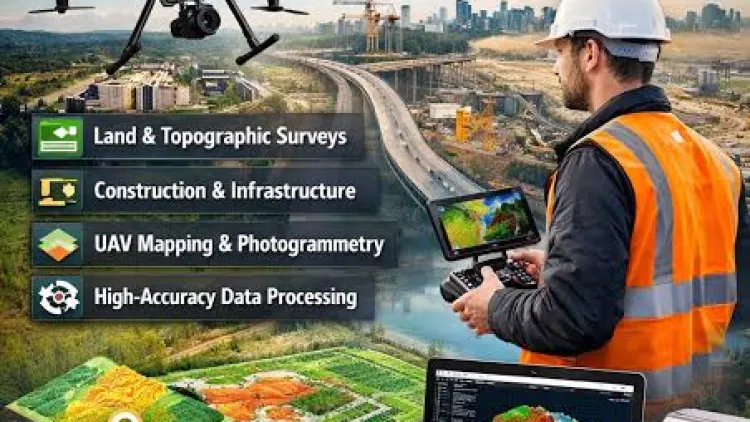
Drones and Unmanned Aerial Vehicles (UAVs) have revolutionized the world of surveying and land use planning. These advanced technologies provide an efficient, cost-effective, and accurate way to capture high-resolution aerial imagery, map vast landscapes, and gather data for land management. The Drones & UAV Mapping for Surveying & Land Use Planning Training Course equips professionals with the necessary skills and tools to leverage UAVs for topographic surveys, land use planning, and geospatial data collection. Participants will learn to operate drones, process aerial data, and apply the information in real-world land use scenarios.
With rapid advancements in UAV technology, this course offers insights into the use of drones for surveying, environmental monitoring, urban planning, infrastructure inspection, and more, ultimately empowering professionals to enhance their project delivery and outcomes.
Curriculum & Topics
15 Topics | 45 Sessions
-
 Workshop 1.1:
Overview of Cloud GIS and Web Mapping Concepts
Workshop 1.1:
Overview of Cloud GIS and Web Mapping Concepts
-
Workshop 1.2:
Benefits of Cloud-based GIS Solutions for Web Mapping
-
Workshop 1.3:
Key Technologies: ArcGIS Online, Leaflet, and Web Mapping Fundamentals
-
Workshop 2.1:
Introduction to ArcGIS Online Interface and Dashboard
-
Workshop 2.2:
Creating and Managing Web Maps in ArcGIS Online
-
Workshop 2.3:
Sharing and Publishing Maps for Collaborative Work
-
Workshop 3.1:
Step-by-Step Guide to Building Interactive Web Maps
-
Workshop 3.2:
Adding Layers, Symbols, and Pop-ups to Web Maps
-
Workshop 3.3:
Configuring Basemaps and Customization Options
-
Workshop 4.1:
Working with Spatial Analysis Tools in ArcGIS Online
-
Workshop 4.2:
Integrating External Data (GeoJSON, CSV, and Shapefiles)
-
Workshop 4.3:
Using Map Viewer for Advanced Mapping Capabilities
-
Workshop 5.1:
Understanding the Leaflet Library and Its Core Features
-
Workshop 5.2:
Setting Up Leaflet for Web Map Development
-
Workshop 5.3:
Customizing Map Controls and Features
-
Workshop 6.1:
Building Interactive Maps Using Leaflet Framework
-
Workshop 6.2:
Adding Markers, Pop-ups, and Custom Icons
-
Workshop 6.3:
Implementing Geolocation and Routing Features
-
Workshop 7.1:
Importing Various Data Formats (GeoJSON, CSV, KML)
-
Workshop 7.2:
Managing Multiple Layers and Layer Control in Web Maps
-
Workshop 7.3:
Using Tile Layers and Dynamic Map Services
-
Workshop 8.1:
Adding Custom Map Controls and Tooltips
-
Workshop 8.2:
Implementing Layer Switching and Interactive Features
-
Workshop 8.3:
Creating Responsive and Mobile-Friendly Web Maps
-
Workshop 9.1:
Integrating Real-Time Data Sources into Web Maps
-
Workshop 9.2:
Configuring Real-Time Updates Using WebSockets or REST APIs
-
Workshop 9.3:
Use Cases for Real-Time Web Mapping (e.g., Weather, Traffic)
-
Workshop 10.1:
Customizing Map Aesthetics with Styles and Themes
-
Workshop 10.2:
Using Mapbox or ArcGIS Online for Custom Map Styling
-
Workshop 10.3:
Design Best Practices for Professional Web Maps
-
Workshop 11.1:
Setting Permissions and Sharing Options for Web Maps
-
Workshop 11.2:
Best Practices for Public vs. Private Map Sharing
-
Workshop 11.3:
Sharing Web Maps via Web Apps, Social Media, and Websites
-
Workshop 12.1:
Introduction to Mobile GIS Applications and Their Importance
-
Workshop 12.2:
Developing Mobile-Friendly Web Maps with Leaflet and ArcGIS Online
-
Workshop 12.3:
Creating Offline Maps for Field Data Collection
-
Workshop 13.1:
Collaborating with Teams through Shared Workspaces
-
Workshop 13.2:
Managing and Sharing Data Layers in ArcGIS Online
-
Workshop 13.3:
Creating and Managing Groups for Collaboration
-
Workshop 14.1:
Building Complex Web Mapping Applications for Real-World Projects
-
Workshop 14.2:
Case Studies on Urban Planning, Disaster Management, and Environmental Monitoring
-
Workshop 14.3:
Implementing Security and Privacy Measures in Web Mapping
-
Workshop 15.1:
Exploring Emerging Trends in Cloud GIS Technology
-
Workshop 15.2:
The Role of Cloud GIS in Smart Cities and IoT Applications
-
Workshop 15.3:
Innovations in Web Mapping and GIS Integration for Future Workflows