
 9 Topics
 10 Days
 47 Sessions
Programme Overview
Training Description
Who Should Attend
- Project and programme professionals
- Human resources professionals
- Customer service professionals
- Government and public-sector employees
- NGO and development-sector professionals
- Entrepreneurs and business owners
- Remote and hybrid workers
- Anyone seeking to improve digital workplace productivity
Session Objectives
- Effectively utilize communication platforms like Slack and Microsoft Teams.
- Conduct productive online meetings and video conferences using Zoom and other platforms.
- Collaborate effectively on projects using shared workspaces and cloud-based tools.
- Communicate and share information seamlessly within teams and across departments.
- Improve communication and collaboration within remote teams.
- Enhance productivity and efficiency through the use of digital tools.
- Utilize digital tools for project management and task tracking.
- Understand and mitigate the challenges of remote communication.
- Enhance their communication skills and build stronger relationships within their organization.
- Stay up-to-date with the latest trends and best practices in digital communication and collaboration.
- Become a more effective communicator and collaborator in a digital workplace.
- Understand the ethical and security considerations of using digital communication tools.
- Learn how to optimize the use of digital tools for specific communication and collaboration needs.
About the Course
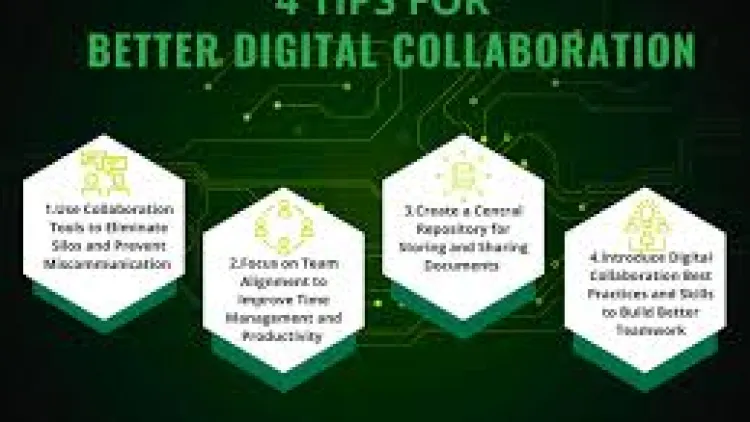
Digital Productivity and Collaboration Masterclass is a practical, hands-on training course designed to equip professionals with the digital skills, tools, and working practices needed to improve productivity, communication, teamwork, and efficiency in modern workplaces. The course explores digital collaboration platforms, task and time management, document sharing, virtual meetings, workflow automation, cloud-based productivity, and responsible use of AI-powered tools.
Participants will learn how to streamline everyday workflows, collaborate effectively across teams and locations, manage digital information, reduce unnecessary administrative tasks, and use technology to achieve better workplace outcomes.
Curriculum & Topics
9 Topics | 47 Sessions
-
 Workshop 1.1:
Understanding the evolving landscape of remote work and collaboration.
-
Workshop 1.2:
The importance of effective digital communication in remote teams.
-
Workshop 1.3:
Overview of popular digital communication and collaboration tools (Slack, Teams, Zoom).
-
Workshop 1.4:
Setting up your digital workspace and optimizing your profile.
-
Workshop 1.5:
Understanding the core features and functionalities of each platform.
-
Workshop 2.1:
Creating and managing channels for effective team communication.
-
Workshop 2.2:
Using direct messaging and group chats for private conversations.
-
Workshop 2.3:
Sharing files and documents within Slack and Teams.
-
Workshop 2.4:
Utilizing search functionality to find information quickly.
-
Workshop 2.5:
Customizing notification settings and managing distractions.
-
Workshop 2.6:
Integrating third-party apps and bots for enhanced productivity.
-
Workshop 3.1:
Scheduling and hosting effective Zoom meetings.
-
Workshop 3.2:
Utilizing screen sharing, virtual backgrounds, and annotation tools.
-
Workshop 3.3:
Managing participants and using breakout rooms for collaboration.
-
Workshop 3.4:
Recording meetings and sharing recordings with attendees.
-
Workshop 3.5:
Troubleshooting common audio and video issues.
-
Workshop 3.6:
Using polling and Q&A features to enhance engagement.
-
Workshop 4.1:
Establishing clear communication protocols and guidelines.
-
Workshop 4.2:
Utilizing shared workspaces and real-time document collaboration.
-
Workshop 4.3:
Implementing project management features within Slack and Teams.
-
Workshop 4.4:
Assigning tasks, setting deadlines, and tracking progress.
-
Workshop 4.5:
Using collaborative whiteboards and mind-mapping tools.
-
Workshop 5.1:
Understanding the nuances of online communication and tone.
-
Workshop 5.2:
Maintaining a professional online presence and demeanor.
-
Workshop 5.3:
Practicing active listening and providing constructive feedback.
-
Workshop 5.4:
Managing time zones and scheduling meetings effectively.
-
Workshop 5.5:
Building rapport and fostering a sense of community in remote teams.
-
Workshop 6.1:
Connecting relevant tools and services to Slack, Teams, and Zoom.
-
Workshop 6.2:
Utilizing integrations for project management, CRM, and other applications.
-
Workshop 6.3:
Automating repetitive tasks and workflows using bots and integrations.
-
Workshop 6.4:
Customizing workflows to meet specific team needs.
-
Workshop 6.5:
Exploring and implementing new integrations to enhance productivity.
-
Workshop 7.1:
Understanding security best practices for digital communication platforms.
-
Workshop 7.2:
Protecting sensitive information and data from unauthorized access.
-
Workshop 7.3:
Managing user permissions and access controls.
-
Workshop 7.4:
Recognizing and avoiding phishing and other security threats.
-
Workshop 7.5:
Ensuring compliance with data privacy regulations.
-
Workshop 8.1:
Diagnosing and resolving common technical issues in Slack, Teams, and Zoom.
-
Workshop 8.2:
Troubleshooting connectivity, audio, and video problems.
-
Workshop 8.3:
Utilizing platform support resources and documentation.
-
Workshop 8.4:
Providing technical assistance to team members.
-
Workshop 8.5:
Implementing backup plans and recovery procedures.
-
Workshop 9.1:
Exploring advanced features and functionalities of each platform.
-
Workshop 9.2:
Staying up-to-date on platform updates and new releases.
-
Workshop 9.3:
Understanding emerging trends in digital communication and collaboration.
-
Workshop 9.4:
Developing a continuous learning plan for improving digital skills.
-
Workshop 9.5:
Applying lessons learned and best practices to real-world scenarios.